Recurring series engine
Create a monthly, quarterly or annual series with a due rule — 'day D of the month, N months after each period ends' — and T4Suite makes each period's task on schedule.
Compliance calendar
The work that sinks a practice isn't the big audit — it's the hundred recurring filings that each slip by a day: GST returns, TDS and TCS returns, ROC filings. T4Suite lets you set a return up once as a series, with the due rule that governs it, and then every period's task appears on the date it's actually due.
Each task is made about six weeks ahead, goes to the right people, and reminds them a week before and a day before. Nobody has to remember what's next.
Part of T4Suite's CA practice management software and its office management software.
Create a monthly, quarterly or annual series with a due rule — 'day D of the month, N months after each period ends' — and T4Suite makes each period's task on schedule.
A series can be for one client, for every client, or for a type of client such as private companies — so a new client of that type gets its returns without anyone setting them up.
Quarters and years follow the Indian financial year, April to March, and each task is named by its period, such as FY26-27 Q2, so the work lines up with how your firm reports.
Each recurring task runs the full job lifecycle — costed, completed and billed like any other engagement — so recurring work is tracked money, not a free-floating reminder.
A due rule has two numbers: the day of the month, and how many months after the period ends. That is enough for most Indian returns. A quarter ends in June, September, December or March. A year ends on 31 March. Here are five series a firm might set up, and the task each makes for one period.
| Return | Rule | Period, and its due date |
|---|---|---|
| GSTR-1, monthly filer | Monthly, day 11, 1 month after | October 2026 → 11 November 2026 |
| GSTR-3B, monthly filer | Monthly, day 20, 1 month after | October 2026 → 20 November 2026 |
| GSTR-1 under QRMP | Quarterly, day 13, 1 month after | FY26-27 Q2 (July–September) → 13 October 2026 |
| Income-tax return, business, no audit | Annual, day 31, 5 months after | FY25-26 → 31 August 2026 |
| Tax audit report | Annual, day 30, 6 months after | FY25-26 → 30 September 2026 |
If the day is past the end of the month, T4Suite uses the month's last day. A rule of 'day 31' therefore lands on 30 September in September and on 28 February in February, and nobody has to write a different rule for short months.
Due dates in this table are the usual ones. CBIC and CBDT extend dates by notification, so check the current date for a return before you rely on it. Our guides to the GST and TDS calendars list the regular dates.
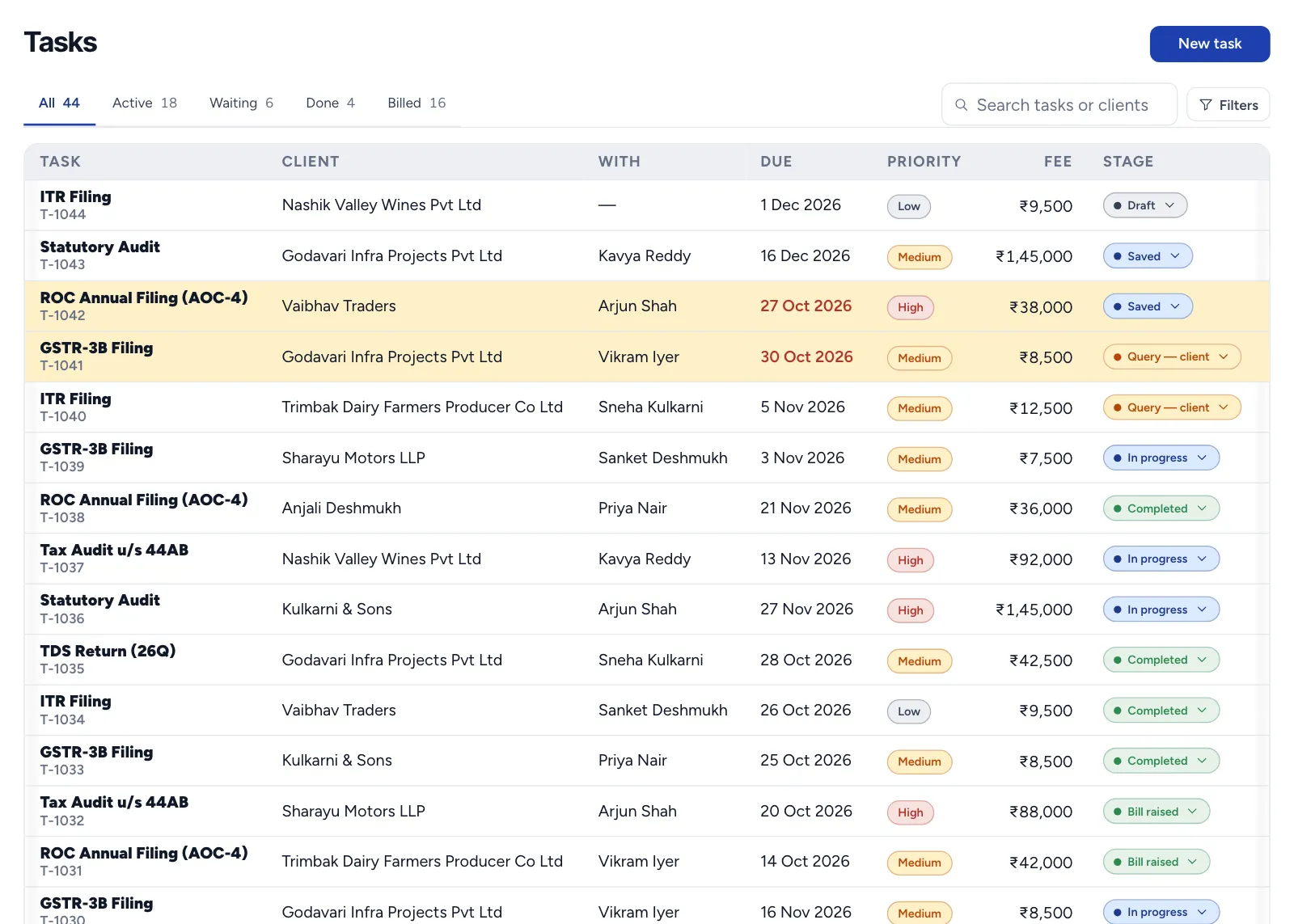
T4Suite checks the series every hour. It makes a task once its due date is 45 days away or less, and never makes the same period twice. Take October's GSTR-3B, due on 20 November:
| Date | What happens | Who sees it |
|---|---|---|
| 6 October | The task is made, 45 days before it is due | The people on the series |
| 13 November | First reminder: due in 7 days | Each person on the task, in the app |
| 19 November | Last reminder: due tomorrow | Each person on the task |
| 20 November | Due today; it shows as late from the next day | The Tasks register and the dashboard |
Each person gets each reminder once. If the hourly run was missed, for example while the server was being updated, the next run sends what is still due. A task that is already completed gets no reminder at all.
The task is made early on purpose. The October GSTR-3B can be planned, given to someone and started when the client's data arrives, instead of appearing in a panic on the 19th.
A firm with forty GST clients should not set up eighty series. A series can name a task type for every client, a type of client, or both. Your firm keeps its own list of client types, such as private companies or partnership firms, and each type has the filings it normally needs.
When the series runs, it makes one task for each client, each period and each filing, and gives each client's task to whoever did that client's last one. A new private-company client therefore gets its returns from the next period on, with the same person as before for the old clients.
Changing a series changes only the tasks it has not made yet. Stopping it stops future tasks; the ones already made stay, with their history. When a single date is different, such as a one-off extension or the fourth quarter of a TDS return, which falls on 31 May while the other three fall a month after the quarter, change the due date on that one task.
A series can carry an estimate: the hours, the rate and the fee. Each task it makes starts with that estimate as a labour line, and overhead for those hours is worked out when the task is made. A partner can then split the hours among the people who did the work.
So the monthly GSTR-3B for a client is a costed job like any other, and at the end of the year the firm can see whether the retainer covered the time. Associates see the tasks and the dates; the fee and the cost are hidden from them.
From the recurring series you set up. Define a series once with its due rule, and T4Suite makes each period's task when its due date is 45 days away. The register and the dashboard then show what is due.
Yes. A series repeats monthly, quarterly or yearly, with a due rule that sets the day of the month and how many months after the period ends the filing is due. Quarters and years follow the Indian financial year.
No. A series can be for one client, for every client, for a type of client, or for one filing for every client of a type. It makes a separate task for each client.
Everyone on the task, once seven days before the due date and once the day before, in the app. A completed task is not reminded.
Change the due date on the tasks already made. Editing the series changes only the tasks it has not yet made.
Yes. A series that names an entity covers that entity's clients only, and its tasks belong to that entity.
A short walkthrough, mapped to your firm's entities and services.